Event Contract Request and Corporate Card Quick Guide
This Quick Guide details the steps for completing an Offsite or Onsite Event Contract Request when you will be using a Travel and Expense Corporate Card to pay the Supplier. You must have an active Coporate Card at the time of your Contract Request submission. The option to indicate that you are paying your Supplier by corporate card is located in the Contract Request's Questions section.
Last Revision: September 2026
Completing Supplier Information for Corporate Card Payment
Begin a Request for an Event Related Onsite Contract or for an Offsite Event & Catering, as needed. Refer to the Requesting a New Contract in the CU Marketplace job aid for detailed instructions.
Once you reach the Supplier Information section of the Questions tab, complete the following steps to indicate you are paying the Supplier with the Travel and Expense Corporate Card:
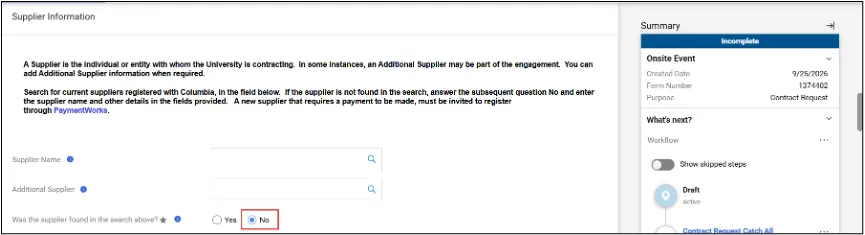
1. Leave the Supplier Name and Additional Supplier fields blank. Select No for Was the supplier found in the search above? Additional fields appear, including a question regarding paying with the Corporate Card.
Note: The PaymentWorks instruction above applies to Contracts Requests where payments will be associated with an Invoice. A Corporate Card can be used to pay any vendor, so PaymentWorks registration is not needed here.
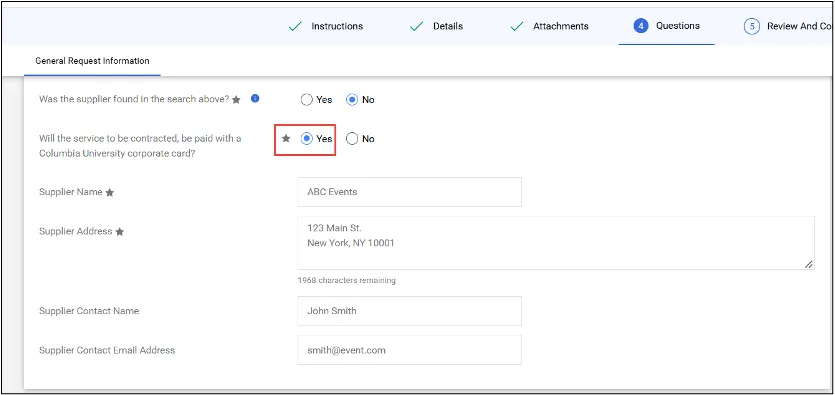
2. Select Yes for Will the service to be contracted be paid with a Columbia University corporate card?.
3. Enter the information for the Supplier Name, Supplier Address, Supplier Contact Name, and Supplier Contact Email Address fields (Name and Address are required; Contact Name/Email are optional). Complete the Contract Request and submit.