FFE Cash Module Changes
This job aid covers the changes to the FFE Cash Module as it relates to Cash and Check Deposits.
Last Revision: July 2017
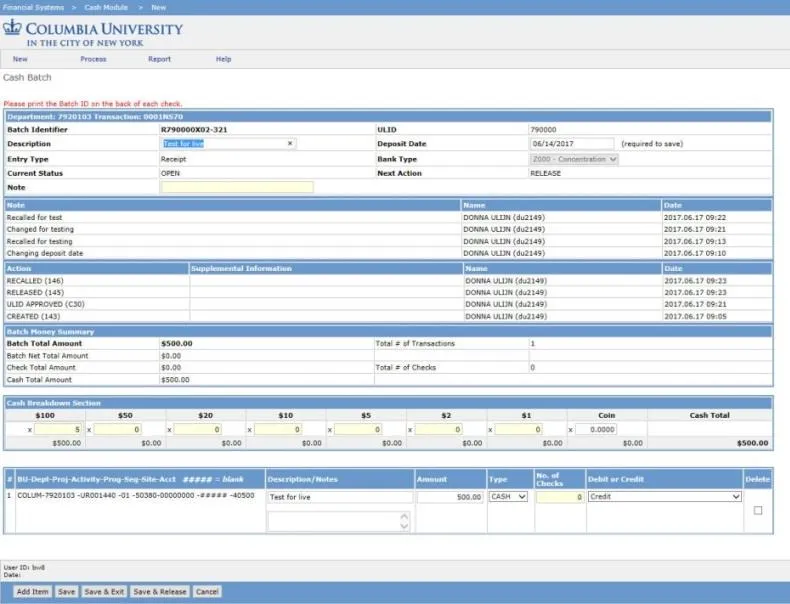
Details
Initiators
When you create a new Batch, the Batch is immediately stamped with a ULID based on the Initiator’s home department.

Note: A ULID is a unique identifier which is assigned to each ARC Level 4 node School or Department and is used to identify departmental deposits.
You are required to enter a Deposit Date in order to be able to Save the Batch.

Approvers
You have the opportunity to change the Deposit Date. If you choose to change the date, a pop up window appears requesting information as to why.
There is no teller approval. When you approve the transaction, it will have a status of Ready for ARC and appear on the Released Items screen.
Initiators with both CUIMC and Morningside access or from one of the following Departments:
- 090200X RES Core Operations
- 091100X RES Environ Health & Safety Off
- 091200X RES Institutional Review Board
- 120600X FAC Public Safety
- 1206103 FAC Pub Safety CUMC Ops
- 1636303 SFS CUMC3
Must select the campus where you are making the deposit after you click to create a new Batch.
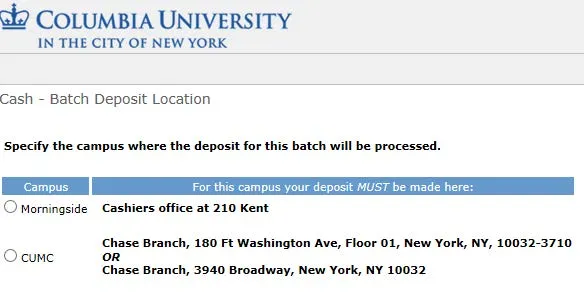
If you select CUIMC, a ULID will be stamped on the Batch and the rest of the CUIMC process will be followed.
If you select Morningside, there will be no ULID and the process will continue as normal for Morningside.
If you are from one of the specified Departments listed above, use a 999999 Miscellaneous deposit ticket.