What is it?
As you select items from the Marketplace, the Category Codes associated with the product are systematically populated for each item in your cart. In addition, the default Natural Account mapped to the Category Code is populated. You should ensure that the Category Code and associated Account are correct and, if necessary, edit the Category Code and/or Account. Refer to the Procurement Category Codes and Natural Accounts job aid.
Viewing a Requisition to View Item Category Codes and Natural Accounts
In order to view the Category Codes and Natural Accounts associated with the items you added to your Cart, you must proceed to the Checkout screen to view the Requisition.
- On the Shopping Cart page, click the Proceed to Checkout button. The Checkout screen appears.


- Scroll down to view the items in your requisition. If the Category Code and Account values are correct for the item, no further action is required.
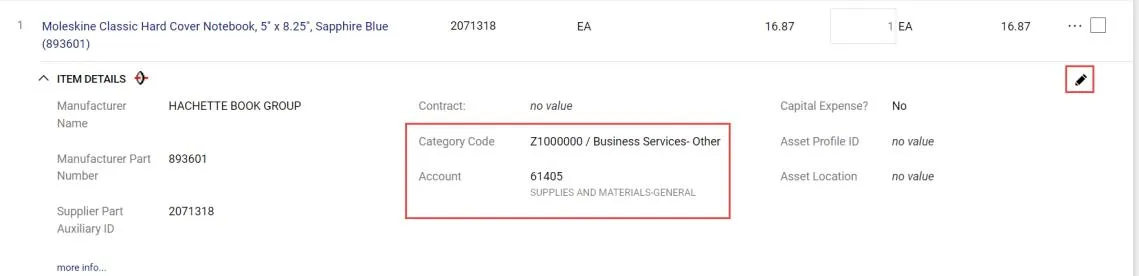
Editing the Category Code or Natural Account
- To edit, click the Edit Line icon. The Edit Line Details window appears.
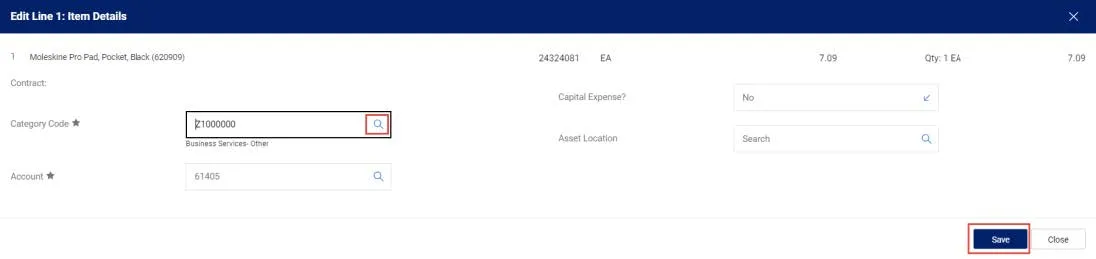
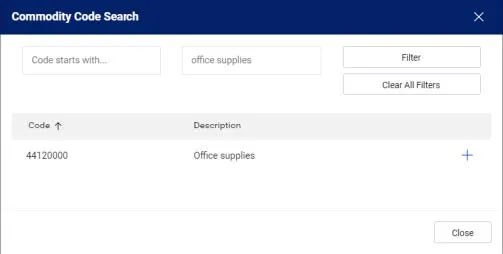
- Search and select the Category Code. After you enter or select the new Category Code, the Account field will initially appear to not update, but will update after saving with the default Account associated with the new Category Code.
- Click Save. The Category Code and the Account field will be updated. If you need to change the Account from the default, reopen the Edit Line Details window to select from the Accounts mapped to the Category Code.