CU Marketplace Tip: Approvers, Return Documents to Initiators for Edits Instead of Rejecting
What is it?
If you are an Approver reviewing a Requisition or Voucher and need the Procurement Initiator to make changes and resubmit, choose the Return option to send the document back for revision. For Requisitions, you have the additional option to Reject. If you select Reject, the Requisition will be terminated and the Initiator will not be able to edit or resubmit.
Returning Documents to Initiators
1. When reviewing the document for approval, click the Assign to Myself button.
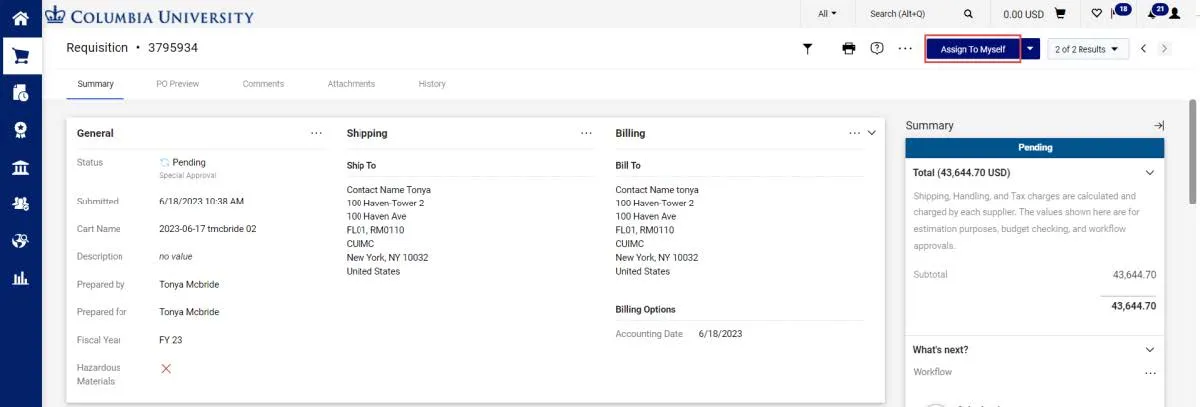
This action locks the document so that other Approvers cannot make changes and allows you to take additional actions.
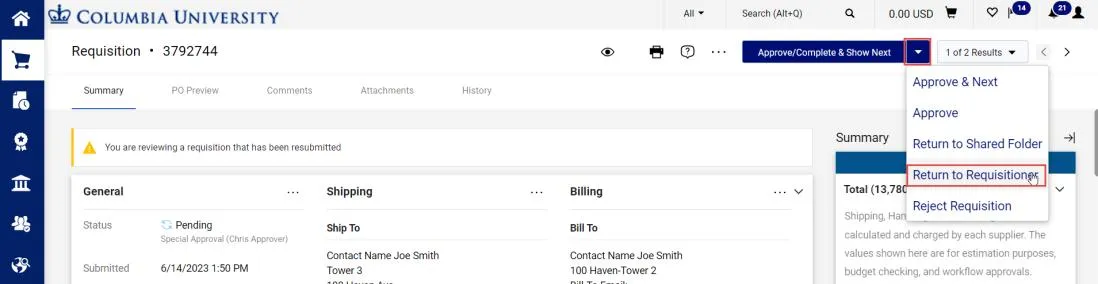
2. Click the dropdown arrow next to the Approve/Complete & Show Next button and click Return to Requisitioner or Return Voucher (the option will vary based on the document type). DO NOT select Reject Requisition, as this will terminate the document and prevent resubmission. The Return window appears.
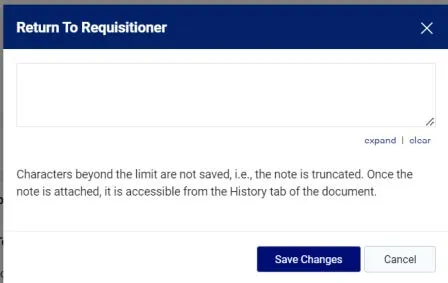
3. Type a Note informing the Initiator why you are returning the document so the Initiator can address the issue. If you are returning a PO Voucher, you should make sure that the Voucher goes back to the Voucher Initiator (labeled as Initiated by) and not the Purchase Order/Requisition Initiator (labeled as Voucher Owner).
4. Click Save Changes.
Where do I get help?
View previous CU Marketplace Tips.
Contact the Finance Service Center.
Log an incident or request a service via Service Now.