CU Marketplace Tip: Attach all required documents as indicated in the Goods and Services Request Form for Non-Catalog Requisitions
What is it?
Based on your Purchasing Information details and the Goods and or Services lines that you added, the Required Attachments page will display the required attachments (indicated with an asterisk *) that you must upload for your purchase. You should ensure that you attach the appropriate document indicated in each field and label them accurately (i.e., Scope of Work, Quote etc.).
Adding Attachments to the Goods and Services Request Form
After you complete all the questions in the Goods and Services Request Form (refer to the Creating a Non-Catalog Requisition in the CU Marketplace job aid for instructions) and navigate to the Attachments page, the Form will display all the Required Attachments.
1. Click the Upload button for each required document indicated to upload the file that satisfies the requirement.
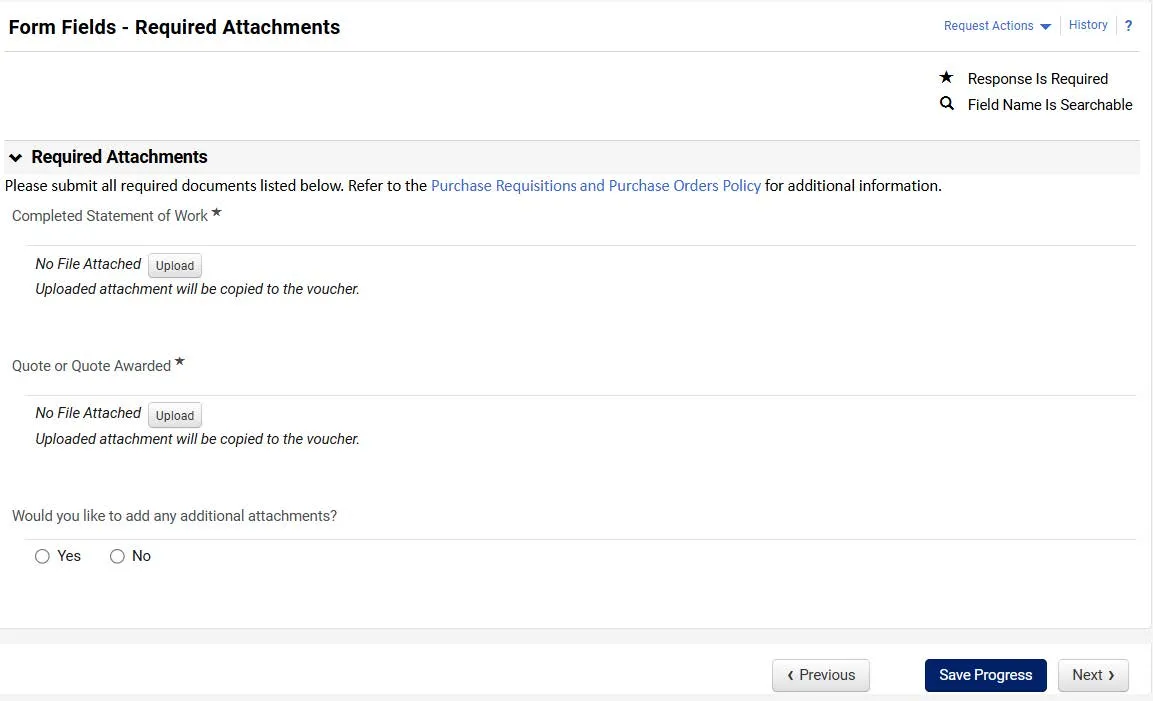
The Upload window appears.
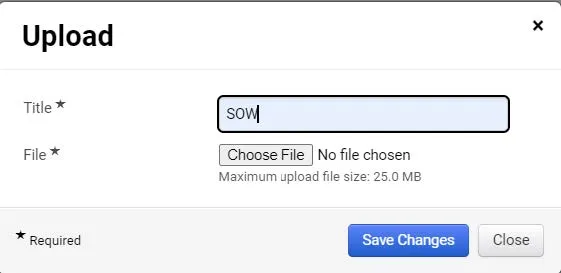
2. In the Title field, enter the type of the document you are uploading (i.e., SOW, COI, Quote), click the Choose File button to search and select your document file. Ensure that you only upload the document that meets the attachment requirement.
3. Click the Save Changes button
Attachments should only be included in the Goods and Services Request Form in the displayed Required Attachment fields. Do not attach documents to the Requisition submission page at Checkout.
In some circumstances, the Purchasing team may require additional documents. If so, they will return the Requisition with a Comment requesting the additional documentation. You can use the Comments feature in the Requisition to attach the additional requested documents. Refer to the CU Marketplace Tip: Use Comments to add additional Attachments to your documents after they are submitted for approval for details.
Where do I get help?
View previous CU Marketplace Tips as well as the CU Marketplace Tips and Best Practices webpage.
Contact the Finance Service Center.
Log an incident or request a service via ServiceNow.