CU Marketplace Tip: Do you have a Quote or Contract when procuring Services with a Non-Catalog Requisition?
What is it?
When completing the Goods and Services Request Form to purchase a Service using a Non-Catalog Requisition, you’ll be asked whether you have a Quote or a Contract. Your response determines what documentation you’ll need to attach to your requisition and if you will be required to submit a Contract Request. It is important to select the correct option based on specific criteria, explained below.
The Goods and Services Request Form Quote or Contract Question
When you begin to complete the Goods and Services Request Form (refer to the Creating a Non-Catalog Requisition in the CU Marketplace job aid for instructions) and select that your purchase includes a Service, the question regarding the Quote or Contract appears. Depending on your answer, additional questions may appear and will determine the information or documents you must upload in the Required Attachments page of the Form.
1. After you select Services or Goods & Services in the Purchasing Information page of the Goods and Services Request Form, the Service Contracts section appears with the Quote or Contract question.
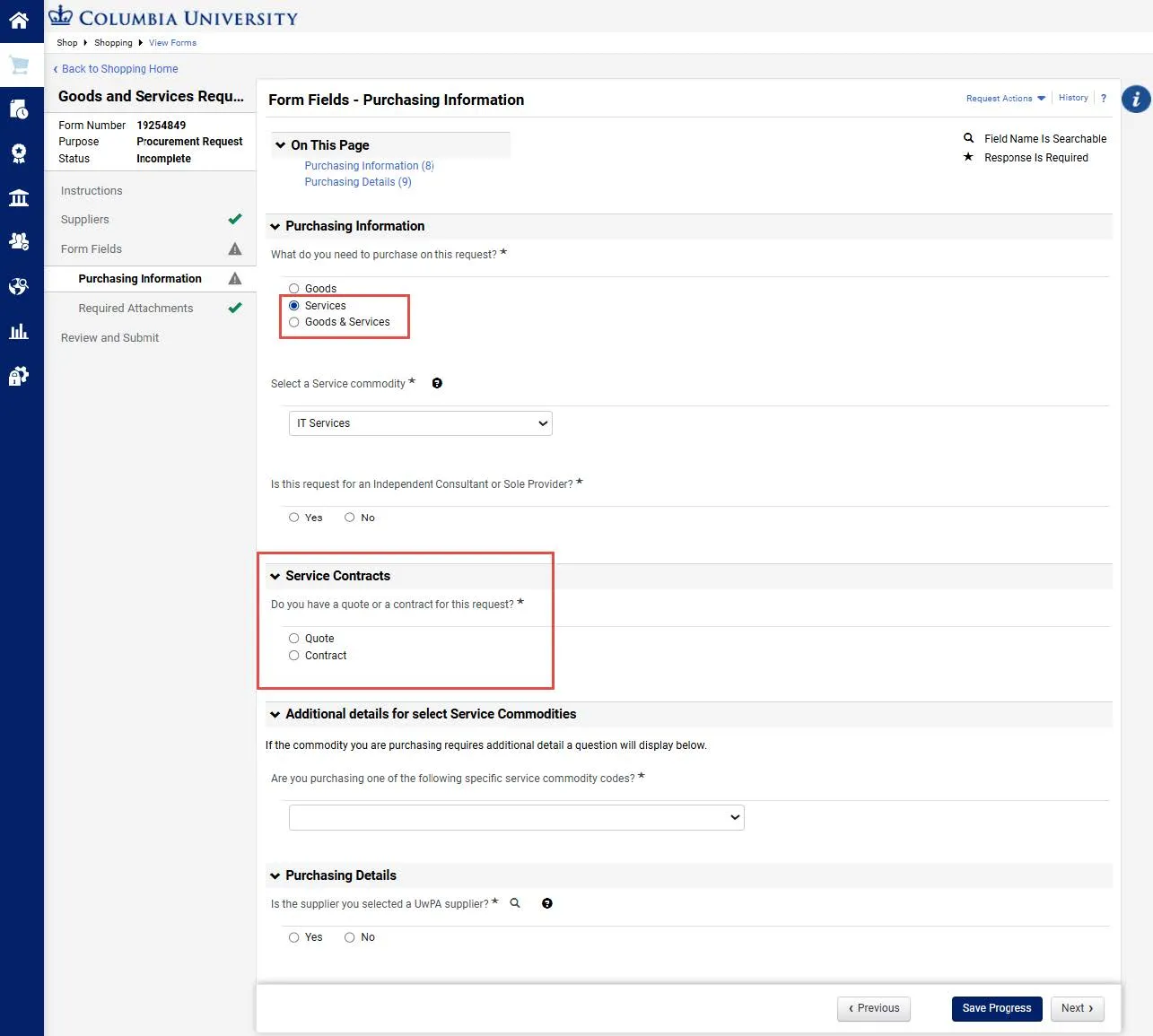
2. Depending on the documentation you have for the Requisition, select either Quote or Contract.
- A Quote originates from the Supplier, typically labeled “Quote”, “Proposal”, or “Order Form”, related to the service, maintenance, or repair of Columbia owned equipment. In addition, annual software renewals, where an agreement is already in place, are considered Quotes. If you select Quote, no additional questions appear on the Form. When you reach the Required Attachments page you will be required to upload Quote documentation.
- A Contract is a document that includes a definition of the parties, a time period of performance, scope and details of the services being performed, and spelled out legal terms and conditions. It requires signatures from Columbia Purchasing and the Supplier. If you select Contract, additional questions appear on the Form to determine whether you have an existing Contract or need to create one.
- If you already have a contract, you’ll be asked to enter the Contract ID.
- If you do not have a contract, you will need to submit a Contract Request. A Contract Request page will appear after the Required Attachments page for you to enter a Contract Request ID. Refer to the Requesting a New Contract job aid for instructions on how to submit a Contract Request.
Note: It is important to make the correct selection. If you select Quote when a Contract is required, the Requisition will be returned for correction and cause delays. If you have questions, contact the Finance Service Center.
Where do I get help?
View previous CU Marketplace Tips as well as the CU Marketplace Tips and Best Practices webpage.
Contact the Finance Service Center.
Log an incident or request a service via ServiceNow.