CU Marketplace Tip: Voucher Approvers, Return PO Vouchers for revisions to the Voucher Initiator (Invoiced by)
What is it?
If you are a Voucher Approver reviewing a Voucher and need the Initiator to make changes and then resubmit into workflow, you should ensure the Voucher is returned to the Voucher Initiator and not the Purchase Order (Requisition) Initiator.
Returning a PO Voucher to the Voucher Initiator
1. When reviewing a Voucher for approval, click the Assign & Further Actions button.
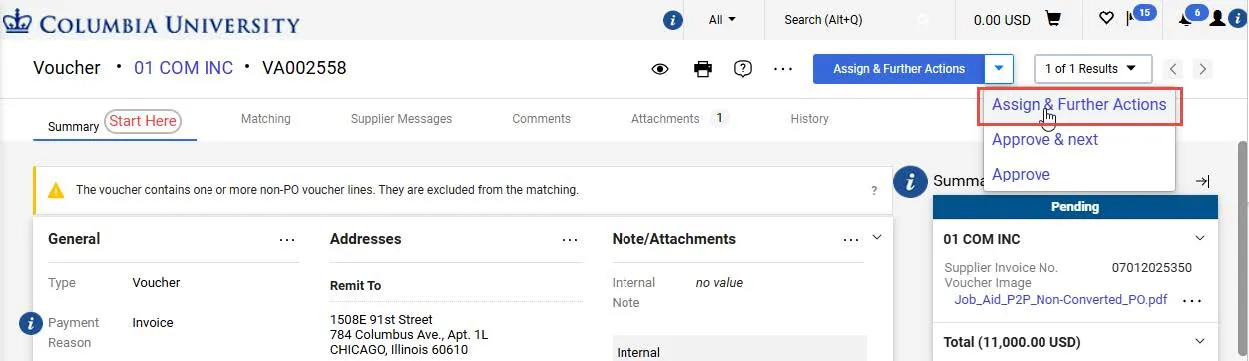
This action locks the document so that other Approvers cannot make changes and allows you to take additional actions.
2. Click the dropdown arrow next to the Approve/Complete & Show Next button and click Return Voucher (the option will vary based on the document type).

The Return window appears listing both the Voucher Initiator (Invoiced by) and the Purchase Order/Requisition Initiator (Voucher Owner).
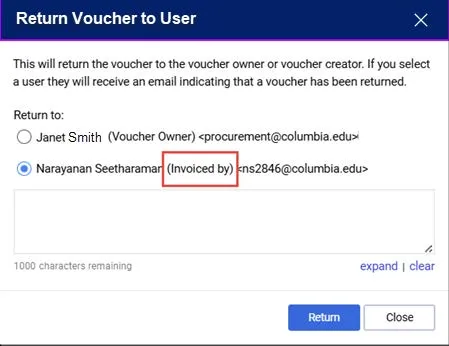
3. To return the Voucher to the Voucher Initiator, select the user labeled as Invoiced by and not the user labeled as Voucher Owner. The latter is the Purchase Order (Requisition) Initiator, not the Voucher Initiator.
4. Type a Note informing the Initiator why you are returning the Voucher so the Initiator can address the issue before resubmitting into workflow.
5. Click Return.
Where do I get help?
View previous CU Marketplace Tips.
Contact the Finance Service Center.
Log an incident or request a service via Service Now.